How It Works
Getting your cafe set up on Coffee Card is quick and easy. Follow these simple steps and start rewarding your customers digitally in minutes.
Download Coffee Card
Download the Coffee Card app to your phone. It's free to download and takes less than a minute to install. Scan the QR Code below or visit this website on your phone and click on the Download App link. Once downloaded click on the Install App link that will appear at the top of the app.
Scan this QR code to download the app on your phone.
Register Your Cafe
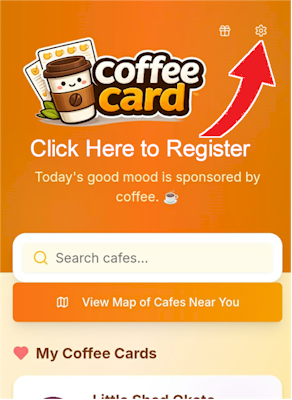
Open the app and follow the simple registration process by clicking on the settings icon at the top right of the app. Enter your cafe's name, location, logo, and set up your loyalty reward (e.g., "Buy 9 coffees, get 1 free"). Your cafe will be discoverable by customers immediately.
Subscribe for $15/month
Coffee Card runs on a simple, affordable $15 per month subscription. No hidden fees, no contracts — cancel anytime. That's less than the cost of a single batch of printed loyalty cards.
Choose Your Stamp Method
You have two easy options to add stamps to your customers' digital coffee cards. Choose the one that works best for your cafe — or use both!
Download & Display Poster
Download our free A4 poster to display in your cafe. It includes a QR code for customers to easily download the Coffee Card app and start collecting stamps right away. Download Poster Here
Two Ways to Add Stamps
Choose the method that suits your cafe best — or use both for maximum flexibility.
Personalised QR Code
Each cafe receives a unique QR code. Simply display it at your counter or on a stand. When a customer makes a purchase, they scan the QR code with their phone and a stamp is instantly added to their digital loyalty card.
4-Digit PIN Code
Prefer a more hands-on approach? Set a custom 4-digit code for your cafe. When a customer orders, you can enter the code directly on the customer's phone to add their stamp.
Everything included. No hidden fees. No contracts. Cancel anytime.
Download Printable Poster
Print and display this A4 poster in your cafe so customers can easily find and download the Coffee Card app.